
Step-by-Step Guide to Install "Get Set Rent"
Follow the instructions below to install Get Set Rent properly based on your system.
Get Set Rent for Android
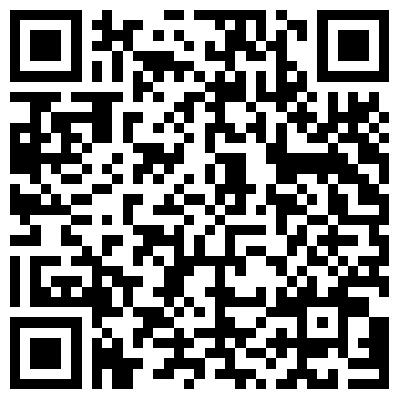
Get Set Rent is also available as an Android app. Scan the QR code below with your mobile camera to download the APK directly on your phone.
| Platform | Version | File Size | Release Date | Download |
|---|---|---|---|---|
| Android | 1.0.0 | 54.5 MB | 8 aug 2026 | Get Set Rent.apk |
System Requirements
To ensure smooth installation and operation of the "Get Set Rent" software, your system must meet the following minimum requirements:
- Operating System: Windows 7, 8, 10 or 11
- .NET Framework: Microsoft .NET Framework 3.5
- Database Support: Microsoft Access 2016 or later, or Access Runtime 365
- Disk Space: At least 50 MB of free hard disk space
Step 1: Find Your Scenario
Check your system below and follow the scenario that matches your setup.
- Search for Microsoft Access in the Start menu to check if it is installed. (see reference image)
- If installed, note the version and bitness: open Access, go to File > Account / Help > About Access. (see reference image)
- If not installed but Microsoft Office is, check your Office version and bitness: open Word / Excel, go to File > Account / Help > About Word/excel. (see reference image)
Scenario A: MS Office below 2016 (2010 / 2013)
- Download and install Access Runtime 365 (32-bit or 64-bit - whichever your system can support; if one does not install, try the other).
- After installing the runtime, download and install the Get Set Rent setup from the download table below.
Scenario B: MS Office 2016 or later WITH Microsoft Access
- No runtime installation is required.
- Directly download and install the Get Set Rent setup matching your Access bitness from the download table below.
Scenario C: MS Office 2016 or later WITHOUT Microsoft Access
- Download and install Access Runtime 365 matching your Office bitness (32-bit or 64-bit).
- After installing the runtime, download and install the Get Set Rent setup from the download table below.
Step 2: Download Required Files
Latest Release : ver - 19.1.2 | Release Date : 01 sep 26 | File Size - 9.4 MB
Pick your bitness and download the files your scenario needs.
| Bitness | Access Runtime 365 (if needed) | Get Set Rent Setup |
|---|---|---|
| 32-bit | Access runtime 365 - 32bit | GSRsetup 19.1.2-16-32bit.exe |
| 64-bit | Access runtime 365 - 64bit | GSRsetup 19.1.2-16-64bit.exe |
This process ensures you install the correct version of "Get Set Rent" for your system setup.
Need Help? We're Just a Call Away!
Whether you're an existing customer or just exploring Get Set Rent — we're here for you!
Not sure which version to download or how to install the update?
No worries — you don't need to be tech-savvy.
Our support team is always happy to guide you step by step and make the process easy for you — completely free of charge.
📞 Call us during office hours on our helpline number: +91 95126 63657 (Tech Support), and our team will be happy to help you.
💬 Or simply click the WhatsApp icon and send us your Store Name + Contact Details. Our team will get in touch with you and help you get started.
You focus on your rental business. We'll take care of the technical part. ❤️
— Team Get Set Rent
💬 Chat with Support